
Portfolio / Healthcare
Automated patient recall for 30,000+ hearing care clients.
A multi-clinic hearing care provider kept every client in its practice software, but recall reminders depended on staff remembering to call. We built a daily pipeline that turns that data into timely, automated reminders in their CRM, plus an executive dashboard for the owners.
- Client
- Hearing care provider, Western Australia (18 clinics)
- Services
- Data engineering, CRM automation, reporting
- Systems
- Auditdata → Azure → GoHighLevel, Power BI
- Worked with
- The client's CRM agency, who built the messaging
Results
The problem
Good data, stuck in the wrong place.
Locked in
Every client's hearing tests, hearing aids, funding and appointments lived in the practice software. The CRM that sends SMS and email knew none of it.
Manual follow-up
Yearly reviews, maintenance renewals and 5-year hearing aid upgrades relied on staff remembering to call. Clients slipped through, and so did revenue.
No overview
The owners had no single view of revenue, sales, conversion and clinic workload across 18 clinics. Reports were rebuilt by hand in spreadsheets.
What we built
One pipeline, four parts.
The practice software stays the single source of truth. Every morning a job reads it, works out what each client is due, and updates the CRM. The CRM's workflows then send the right message on the right day.
Daily data pipeline
Practice software → cloud server → CRM, every morning, with no one at a keyboard.
- Reads the practice software's data warehouse with one SQL model: one row per client
- Runs on a schedule on an Azure server, and sends only what changed
- Emails a short summary after every run
Smart recall fields
The CRM gets the dates and flags its campaigns need, ready to use.
- Review due, upgrade due, maintenance reminder and next appointment dates
- Yes/No flags such as Is aided, Has hearing loss and Has upcoming appointment
- Dates move by themselves when a client renews or has a new test
Safety built in
A daily job that writes to a live CRM has to be careful.
- Waits for the source data to finish loading before it reads anything
- Stops itself if the data looks wrong, and pauses big changes for a person to approve
- Never touches opt-outs, tags or Do Not Disturb settings
Executive dashboard
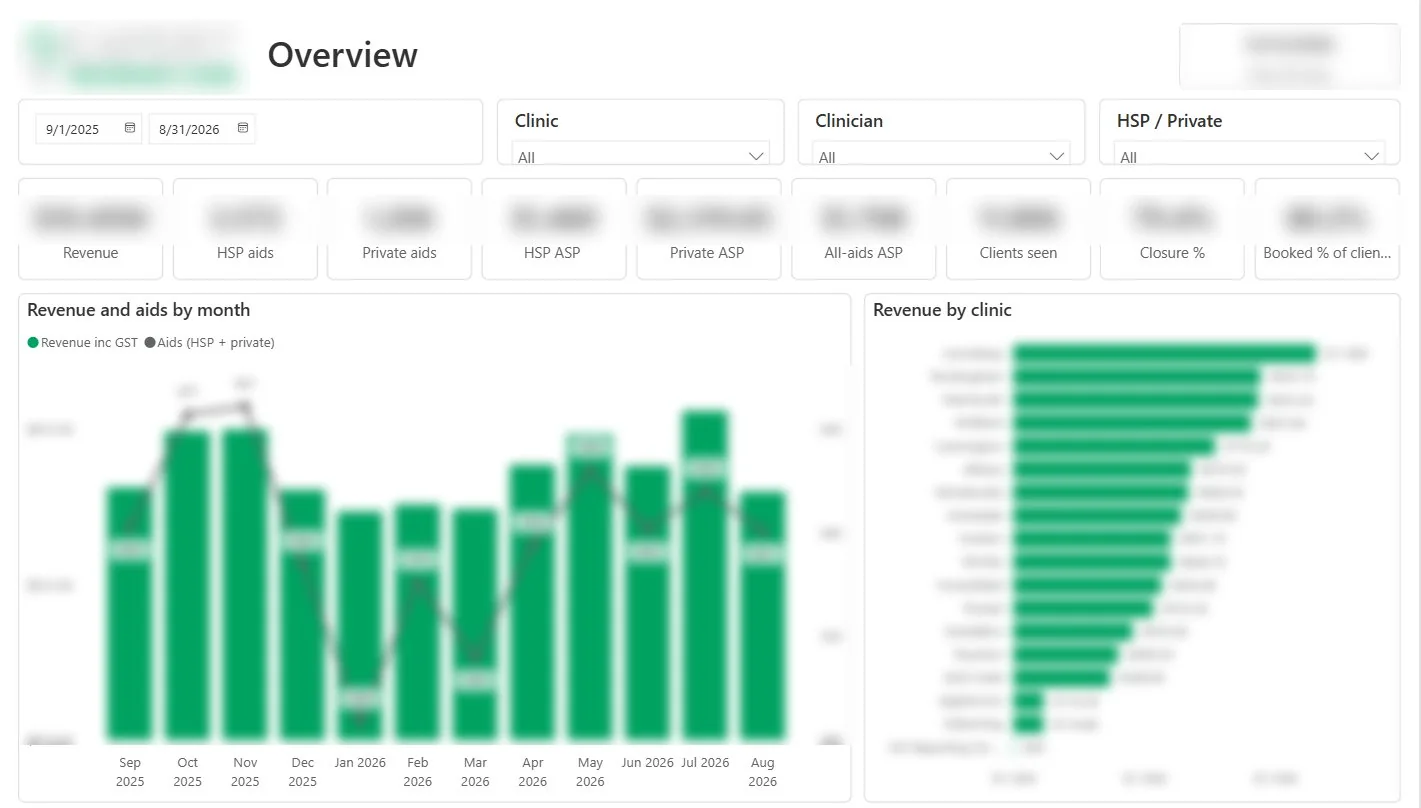
A daily-refreshed Power BI report for the owners and clinic managers.
- Revenue, average selling price, hearing aids sold and conversion
- Returns and swaps, refits and clinic utilisation
- Every KPI defined in plain words, with a data dictionary
How it fits together
From practice software to the right message.
What it powers
Recall campaigns that start on the right day.
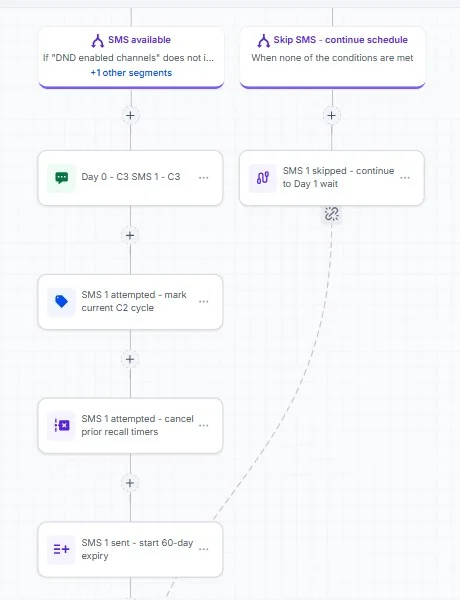
Each campaign starts from a date the pipeline works out. The CRM checks those dates every morning and starts the right campaign for each client.
Built to run unattended
A job that knows when not to run.
Health data and a live CRM leave no room for a bad push. So the pipeline checks itself before it sends anything, and tells a person what happened after every run.
- Weekend data reloads empty the source tables for a while, so the job waits until they're full again.
- If an important field suddenly drops by more than 5%, the run stops.
- Changes to more than 2,000 contacts wait for a person to approve the exact number.
- Logs and emails hold counts only, never patient names or contact details.
Reporting
A dashboard the owners actually trust.
A second daily job builds reporting tables in Azure SQL, and Power BI reads them. Every number was checked against the client's own reports before go-live, and every KPI has a written definition, so a clinic manager and the owner read a number the same way.
Challenges solved
The real-world problems along the way.
Couples share an email and phone number
Matching CRM contacts by email would have merged two people into one record.
FIXEach client is matched by a stored contact ID, with the client number as a backup link. Never by email or phone.
The source data empties itself at weekends
The warehouse does a full reload on weekend mornings, and tables sit empty for a while.
FIXA ready check counts every table twice, a few minutes apart, and waits until the data is complete.
CRM date triggers that wouldn't fire
A "45 days before" reminder never started, even for clients who matched.
FIXTesting showed the trigger only works with no filters, so the timing moved into the pipeline's dates instead.
Numbers the owners would recognise
A dashboard is only useful if it matches the figures the business already trusts.
FIXEach KPI rule (GST, replacements, returns) was agreed in writing and checked line by line until revenue matched to the cent.
Tech used
The tools behind it.


Need your business software talking to your CRM?
We connect business systems, automate the follow-up and build reporting you can trust.
Client details are anonymised. Screenshots are real, with figures, names and the client's logo blurred. No patient information is shown.